# 建立帳號
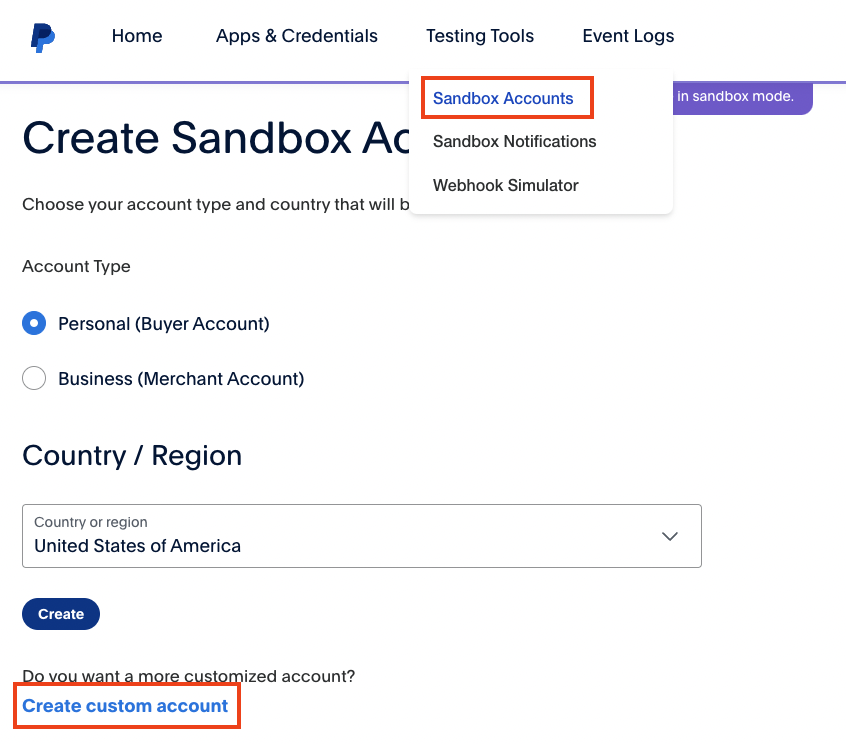
在 PayPal Developer 建立 Personal Account & 一個 Business Account,並在 Sandbox 創建一個 Business Account,這樣就可以在 Sandbox 裡面進行測試。
Testing Tools -> Sandbox Accounts -> Create account -> Create custom account
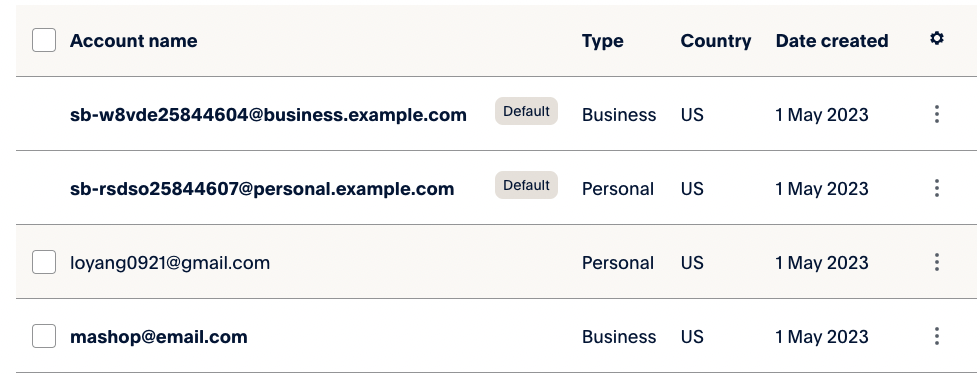
- Business Account:收款帳號
- Personal Account:匯款用帳號
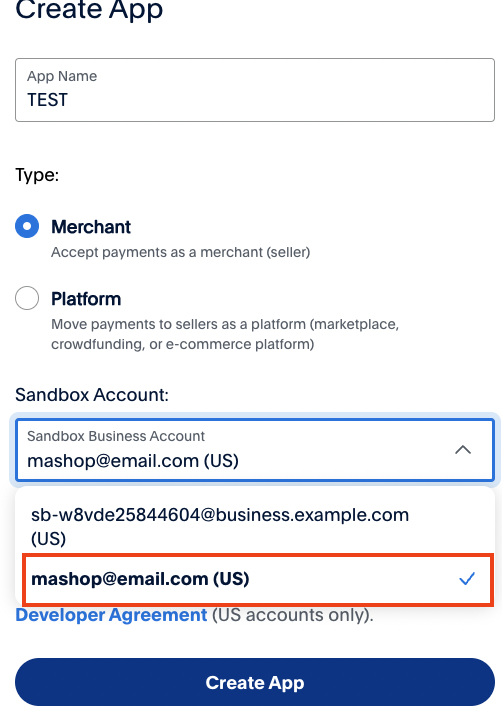
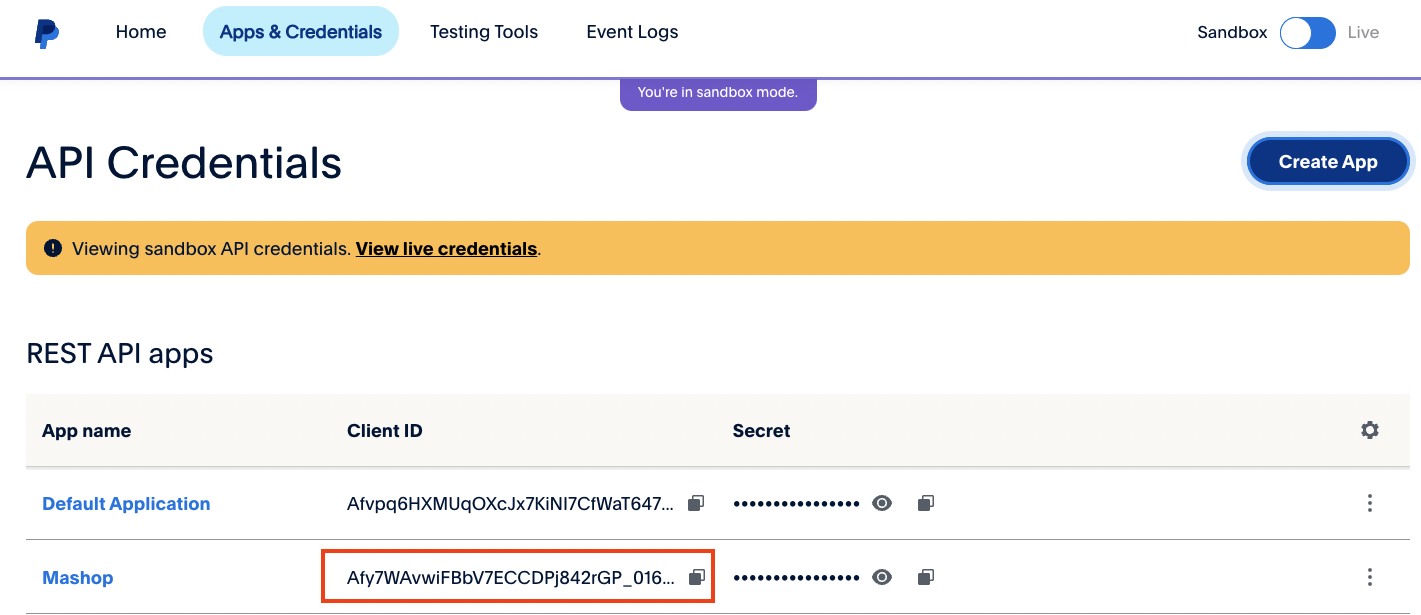
接下來至 App & Credentials 頁面創建 App,並且記得 Sandbox Account 要選剛剛創建的 Business Account
創建完後,就可以在 Dashboard 上看到剛剛創建的 App,等等要負責拿來做 API CALL 的就是 Client ID,而 Secret Key 跟大多數 API 邏輯一樣,不應公開。
# 程式碼撰寫
相較以往舊的寫法直接跟付款頁面寫在一起,我會改用寫成 Component 並傳遞 options 進去,這樣可以讓程式碼更好維護,也可以讓不同的付款頁面使用不同的 options。
# 建立 Component
建立一個名為 PayPalPayment.js 的 Component:
# 無限循環更新 BUG
原本若將 dispatch,options 寫進 useEffect 的依賴陣列內,會出現 Warning: Maximum update depth exceeded. This can happen when a component calls setState inside useEffect, but useEffect either doesn't have a dependency array, or one of the dependencies changes on every render.錯誤。
白話文:在 useEffect 裡造成無限循環更新
useEffect 的依賴陣列包含 currency, showSpinner, dispatch, options,而 showSpinner 始終為 false,這不會導致無限循環更新。所以問題應該是出在 options 對象。
這個問題出現是因為 options 對象在每次渲染時引用都會改變,即使其內部屬性值沒有更改。這導致 useEffect 無限次地重新運行,從而導致最大更新深度超出的警告。
// PayPalPayment.js
useEffect(() => {
  dispatch({
    type: "resetOptions",
    value: {
      ...options,
      currency: currency,
    },
  });
}, [currency, showSpinner, dispatch, options]);
解決辦法:
- 使用
JSON.stringify()來比較 options 對象是否有更改。這可以避免在 options 對象的屬性值相同但引用不同時觸發重新渲染。 - 使用
React.useMemo來優化 options 對象的計算。將僅在 currency 或 options 更改時重新計算 updatedOptions 對象。
# 完整程式碼
最終程式碼:
// PayPalPayment.js
import React, { useEffect } from "react";
import {
  PayPalScriptProvider,
  PayPalButtons,
  usePayPalScriptReducer,
} from "@paypal/react-paypal-js";

const ButtonWrapper = ({ currency, amount, onSuccess, showSpinner }) => {
  const [{ options, isPending }, dispatch] = usePayPalScriptReducer();

  const updatedOptions = React.useMemo(() => {
    return {
      ...options,
      currency: currency,
    };
  }, [currency, options]);

  useEffect(() => {
    if (JSON.stringify(options) !== JSON.stringify(updatedOptions)) {
      dispatch({
        type: "resetOptions",
        value: updatedOptions,
      });
    }
  }, [currency, showSpinner, dispatch, updatedOptions, options]);

  return (
    <>
      {showSpinner && isPending && <div className="spinner" />}
      <PayPalButtons
        style=<!--swig0-->
        disabled={false}
        forceReRender={[amount, currency]}
        fundingSource={undefined}
        createOrder={(data, actions) => {
          return actions.order
            .create({
              purchase_units: [
                {
                  amount: {
                    currency_code: currency,
                    value: amount,
                  },
                },
              ],
            })
            .then((orderId) => {
              return orderId;
            });
        }}
        onApprove={(data, actions) => {
          return actions.order.capture().then(() => {
            onSuccess();
          });
        }}
      />
    </>
  );
};

const PayPalPayment = ({ amount, onSuccess }) => {
  const currency = "TWD";

  return (
    <div style=<!--swig1-->>
      <PayPalScriptProvider
        options=<!--swig2-->
      >
        <ButtonWrapper
          currency={currency}
          amount={amount}
          onSuccess={onSuccess}
          showSpinner={false}
        />
      </PayPalScriptProvider>
    </div>
  );
};
export default PayPalPayment;
# 使用 Component
// OrderPage.js
...
import PayPalPayment from "../components/PayPalPayment";
  .............
  const [sdkReady, setSdkReady] = useState(false);

  const orderDetails = useSelector((state) => state.orderDetails);
  const { order, error, loading } = orderDetails;

  const orderPay = useSelector((state) => state.orderPay);
  const { loading: loadingPay, success: successPay } = orderPay;
  .............
  useEffect(() => {
    if (!order || successPay || order.id !== Number(orderId)) {
      // 沒 RESET 會一直導致跑 <Loader />
      dispatch({ type: ORDER_PAY_RESET })
      dispatch(getOrderDetails(orderId));
    } else if (!order.isPaid) {
      setSdkReady(true);
    }
  }, [dispatch, navigate, order, orderId, successPay]);

  const successPaymenyHadler = (paymentResult) => {
    console.log(paymentResult);
    dispatch(payOrder(orderId, paymentResult));
  };
  return (
    <>
    .............
        {/* PayPal  */}
        {!order.isPaid && (
            <ListGroup.Item>
            {" "}
            {loadingPay && <Loader />}
            {!sdkReady ? (
                <Loader />
            ) : (
                <PayPalPayment
                amount={order.totalPrice}
                onSuccess={successPaymenyHadler}
                />
            )}
            </ListGroup.Item>
        )}
    .............
    </>
  )
# 驗證交易結果 Sandbox.paypal
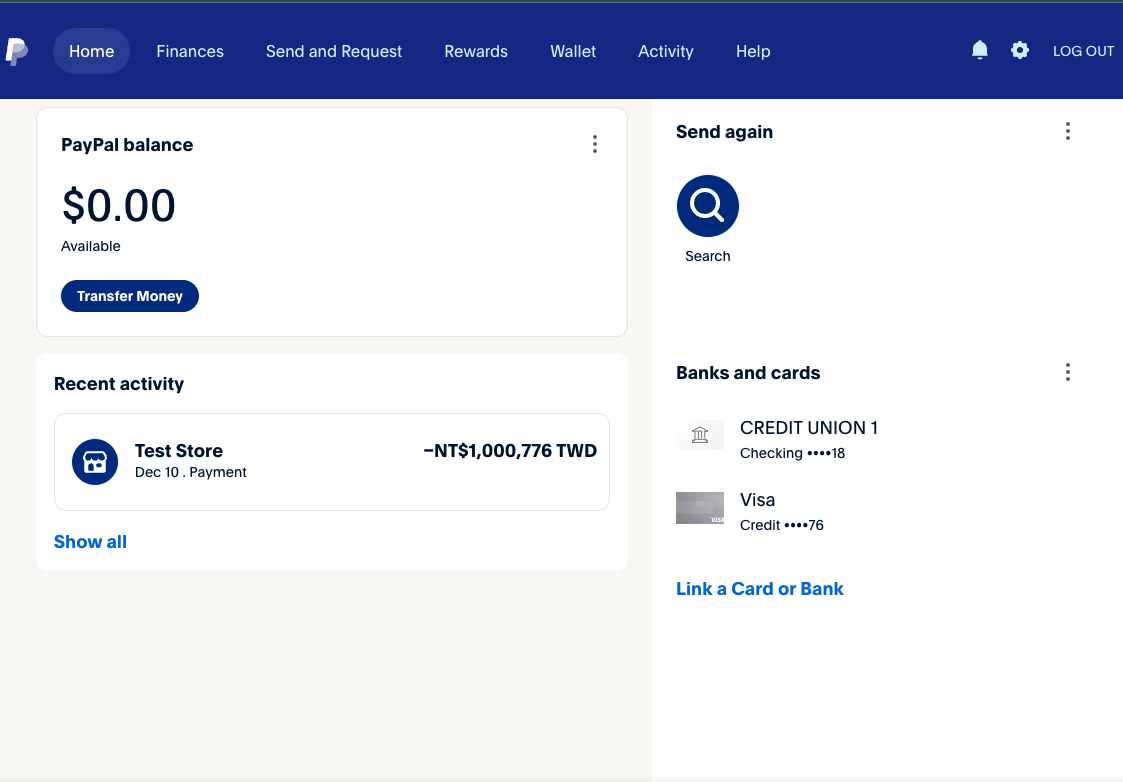
去 www.sandbox.paypal 用剛剛創的 Business Account 帳號登入,看到剛剛的交易紀錄就代表成功了。