
# 為什麼需要 MFE?
當一個前端專案的 codebase 超過一定規模,幾個現象會開始出現:
- 每次 deploy 都要跑完整 regression test,即使只改了一個小 component
- 兩個 feature 同時在開發,PR 卡來卡去,互相等待
- 新人要花好幾週才能摸清整個 codebase 再開始貢獻
- 不同模組的邏輯耦合在一起,牽一髮動全身
這些都是 monolith frontend 的典型痛點。Micro Frontend(MFE)的概念源自後端的 microservices:把一個龐大的前端應用拆成多個獨立開發、獨立部署的子應用,各自有自己的 repo、CI/CD、甚至技術棧。
# MFE 的核心概念
MFE 的實作方式有很多種(iframe、Web Components、路由分發等),本文聚焦在目前最主流的方案:Module Federation。
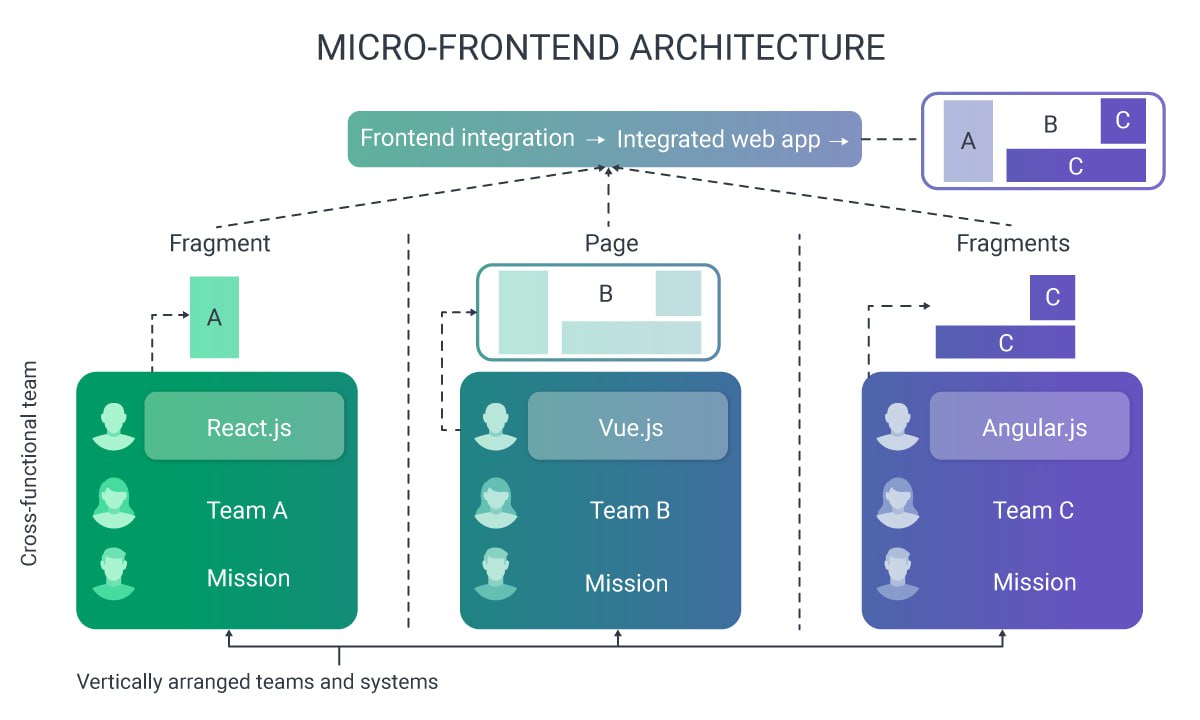
每個團隊負責自己的子應用(Fragment 或 Page),使用不同技術棧(React、Vue、Angular),最終整合成一個完整的 web app。
# Host 與 Remote
Host App                              Remote App
┌─────────────────────────┐           ┌──────────────────────┐
│ route: /remote/*        │  ───────  │ exposes: ./App       │
│ <RemoteLoader>          │           │ remoteEntry.js       │
│                         │   props   │ RemoteAppProps:      │
│ 傳入:                  │  ──────►  │ - auth               │
│ - accessToken           │           │ - project            │
│ - organizationId        │           │ - apiBaseUrl         │
│ - project               │           │ - basePath           │
│ - apiBaseUrl            │           │ - theme / language   │
└─────────────────────────┘ └──────────────────────┘- Remote:把自己的元件 expose 出去,build 後產生
remoteEntry.js - Host:在 runtime 動態載入 Remote 的
remoteEntry.js,取得元件後渲染
# Shared Libraries
Host 和 Remote 會共用同一份 react、react-dom 等核心套件。Module Federation 的 shared 設定讓兩邊協商使用同一個實例,避免重複載入和版本衝突。
# 技術棧
本文使用 @originjs/vite-plugin-federation,這是 Webpack Module Federation 的 Vite 實作版本。
pnpm add -D @originjs/vite-plugin-federation# Step 1:Remote 側設定
# vite.config.ts
import federation from "@originjs/vite-plugin-federation";

const enableMFE = process.env.VITE_MFE_MODE === "true";

export default defineConfig({
  plugins: [
    react(),
    ...(enableMFE ? [
      federation({
        name: "remoteApp",
        filename: "remoteEntry.js",
        exposes: {
          "./App": "./src/RemoteApp.tsx",
        },
        shared: {
          // generate: false → 不打包進 Remote,直接用 Host 提供的版本
          react: { singleton: true, requiredVersion: "^19.0.0", generate: false },
          "react-dom": { singleton: true, generate: false },
          "react-router-dom": { singleton: true, generate: false },
          "@tanstack/react-query": { singleton: true, generate: false },
        },
      }),
    ] : []),
  ],
  build: {
    target: "esnext",
    minify: false,
    cssCodeSplit: false,
  },
  // ⚠️ MFE 模式下 base 必須是絕對路徑
  // build 出的 chunks 路徑相對於 base,設錯會讓 Host 從自己的 domain 找 chunks → 404
  base: enableMFE
    ? (process.env.VITE_MFE_BASE_URL || "http://localhost:5175/")
    : "/",
});
# RemoteApp.tsx — 對外入口
Remote 對外只暴露一個元件,所有內部細節全部封裝:
export interface RemoteAppProps {
  auth: {
    accessToken: string;
    organizationId: string;
  };
  project: { id: string; name: string } | null;
  apiBaseUrl: string;
  basePath?: string;
  language?: string;
  theme?: "light" | "dark" | "system";
}

export default function RemoteApp(props: RemoteAppProps) {
  const { auth, apiBaseUrl } = props;

  useEffect(() => {
    initializeApiClient(apiBaseUrl, () => ({
      Authorization: `Bearer ${auth.accessToken}`,
      "X-Org-ID": auth.organizationId,
    }));
  }, [auth, apiBaseUrl]);

  return (
    <QueryClientProvider client={queryClient}>
      <AppProvider {...props}>
        <AppRoutes />
      </AppProvider>
    </QueryClientProvider>
  );
}
Props 是 Host 和 Remote 之間的唯一契約:auth、config、callback,清楚定義邊界。
# Step 2:Host 側設定
# vite.config.ts
import federation from "@originjs/vite-plugin-federation";

const enableMFE = mergedEnv.VITE_MFE_MODE === "true";
const remoteUrl = mergedEnv.VITE_REMOTE_APP_URL || "http://localhost:5175/assets/remoteEntry.js";

if (enableMFE) {
  plugins.push(
    federation({
      name: "hostApp",
      remotes: {
        remoteApp: remoteUrl,
      },
      shared: {
        // eager: true → Host 提前載入,Remote 直接複用,確保只有一份實例
        react: { singleton: true, requiredVersion: "^19.0.0", eager: true },
        "react-dom": { singleton: true, eager: true },
        "react-router-dom": { singleton: true },
        "@tanstack/react-query": { singleton: true },
      },
    })
  );
}

// 非 MFE 模式需要 stub,否則 dev server 找不到虛擬模組會報錯
if (!enableMFE) {
  plugins.push({
    name: "stub-mfe-remotes",
    enforce: "pre",
    resolveId(source) {
      if (source === "remoteApp/App") return "\0remoteApp/App";
    },
    load(id) {
      if (id === "\0remoteApp/App") return "export default function(){return null}";
    },
  });
}
# RemoteLoader.tsx
const MFE_ENABLED = import.meta.env.VITE_MFE_MODE === "true";

// Dev mode 下需要手動 bootstrap shared scope
// @originjs/vite-plugin-federation 在 dev mode 不會正確注入版本號(版本號是 undefined)
// 手動把 react/react-dom 注入 __federation_shared__ 來修補這個問題
async function bootstrapSharedScope() {
  const g = globalThis as Record<string, unknown>;
  if (!g.__federation_shared__) g.__federation_shared__ = {};
  const shared = (g.__federation_shared__ as any).default
    ?? ((g.__federation_shared__ as any).default = {});

  const register = async (name: string, version: string, importer: () => Promise<unknown>) => {
    if (!shared[name] || Object.keys(shared[name]).every(v => v === "undefined")) {
      const mod = await importer();
      shared[name] = {
        [version]: { get: () => () => mod, loaded: true, from: "host", scope: ["default"] },
      };
    }
  };

  await Promise.all([
    register("react", "19.2.4", () => import("react")),
    register("react-dom", "19.2.4", () => import("react-dom")),
  ]);
}

const RemoteApp = lazy(
  MFE_ENABLED
    ? () => bootstrapSharedScope().then(() => import("remoteApp/App"))
    : () => Promise.resolve({ default: () => <p>Remote 模組未啟用</p> })
);

export function RemoteLoader({ basePath = "/remote" }) {
  return (
    <ErrorBoundary FallbackComponent={ErrorFallback}>
      <Suspense fallback={<div>載入中...</div>}>
        <RemoteApp
          auth={authInfo}
          project={currentProject}
          apiBaseUrl={API_BASE_URL}
          basePath={basePath}
          theme={resolvedTheme}
        />
      </Suspense>
    </ErrorBoundary>
  );
}
# 路由掛載
// ⚠️ path 必須是 "remote/*",通配符不能少
// 否則 Remote 內部子路由會 404
{
  path: "remote/*",
  element: <RemoteLoader basePath="/remote" />,
}
# Step 3:本地開發
# Terminal 1 — 啟動 Remote
cd remote-app
pnpm dev:mfe   # port 5175

# Terminal 2 — 啟動 Host
cd host-app
pnpm dev:mfe   # port 5174,從 localhost:5175 載入 Remote
# Step 4:部署
# Remote build(base 設成部署後的公開 URL)
VITE_MFE_MODE=true VITE_MFE_BASE_URL=https://remote-app.pages.dev/ pnpm build:mfe

# Host build
VITE_MFE_MODE=true VITE_REMOTE_APP_URL=https://remote-app.pages.dev/assets/remoteEntry.js pnpm build:mfe
Remote 部署環境需要設 CORS header,否則 Host 動態載入 remoteEntry.js 會被瀏覽器擋掉:
Access-Control-Allow-Origin: *Cloudflare Pages 預設支援,自架 nginx 需要手動加。
# 實戰踩坑
# 1. Dev mode shared scope 版本號是 undefined
這是 @originjs/vite-plugin-federation 的已知問題。Dev mode 下 shared modules 的版本號會是 undefined,導致 Host 和 Remote 無法匹配,各自載入一份 react 實例。
症狀:瀏覽器 console 出現
Invalid hook call. Hooks can only be called inside of the function component.解法就是前面提到的 bootstrapSharedScope(),在 import("remoteApp/App") 之前手動把正確版本號注入 __federation_shared__。
# 2. 舊專案技術棧衝突:Redux vs Zustand
整合時最常遇到的問題不是技術,是歷史包袱。
我們公司有個舊 Host App,狀態管理用 Redux Toolkit;Remote 是新寫的,用 Zustand。兩者並不衝突,因為 Module Federation 的 shared 設定裡根本沒有這兩個套件——它們各自獨立,不需要 singleton。
但問題出在跨越邊界的狀態共享:Remote 需要知道 Host 的當前 project,Host 的 project 存在 Redux store 裡。一開始我們試著把 Redux store 傳進去,但 Remote 沒有依賴 Redux,強行引入會讓 Remote 的 bundle 變大,也破壞了 Remote 的獨立性。
最後的解法是:Host 把需要的狀態萃取成 plain object,透過 props 傳給 Remote。Remote 只吃 props,不碰 Host 的任何 store。這也是為什麼 RemoteAppProps 要設計成純資料結構,而不是傳 store instance。
# 3. React Hook 衝突(兩份 React 實例)
症狀同上,但原因不同——不是版本號 undefined,而是 shared 設定根本沒對齊。
常見的錯誤設定:
// ❌ Remote 忘了設 generate: false
shared: {
  react: { singleton: true },  // 沒有 generate: false
}
這樣 Remote 會自己打包一份 react,Host 也有一份,兩份共存,hook 呼叫跨實例就爆炸。
正確做法:
- Host:
eager: true(先載入) - Remote:
generate: false(不打包,直接用 Host 的)
# 4. Vite 版本不一致導致 federation 失效
@originjs/vite-plugin-federation 對 Vite 版本有硬性要求:
| plugin 版本 | 支援 Vite |
|---|---|
| 1.3.x | Vite 4.x |
| 1.4.x+ | Vite 5.x+ |
Host 是舊專案跑 Vite 4,Remote 裝了 Vite 5 + plugin 1.4.x,結果怎麼設定都不通。解法是統一兩邊的 Vite 版本,或把舊 Host 的 Vite 升上來。升 Vite 版本通常比想像中痛,要預留時間。
# 5. CSS 樣式互蓋(Tailwind class 衝突)
Host 和 Remote 都用 Tailwind,但設定不同:Host 用 media 策略切換 dark mode,Remote 用 class 策略。結果 Remote 嵌入 Host 之後,dark mode 的邏輯打架,部分元件顯示異常。
目前沒有完美解法,幾個方向:
- 統一策略:兩邊對齊 Tailwind 設定(最乾淨但需要協調)
- CSS prefix:Tailwind 4 支援
@layerprefix,讓 Remote 的 class 帶前綴避免衝突 - Shadow DOM:成本最高,但隔離最徹底
# 什麼情況不適合用 MFE?
MFE 不是銀彈。以下情況貿然導入反而會讓開發更痛:
- 團隊人數少:MFE 的收益來自多團隊並行,如果只有 2~3 人,拆分的 overhead 大於收益
- 功能還在快速迭代:Remote 的 props API 一旦確定就很難改,快速迭代期間介面設計會頻繁變動
- Host App 技術棧太舊:不支援 ES Module dynamic import 的環境(Vue 2、jQuery、CRA 未 eject)無法使用 Module Federation,只能退回 iframe 方案
- 功能邊界不清晰:強行拆分邊界不明確的模組,只會讓跨越邊界的溝通更麻煩
# 總結
| 場景 | 建議 |
|---|---|
| 大型專案、多團隊 | ✅ MFE 收益明顯 |
| 功能穩定、邊界清晰 | ✅ 適合導入 |
| 小團隊、快速迭代 | ⚠️ 先評估 overhead |
| 舊技術棧 Host | ❌ 先升級或用 iframe |
MFE 解決的是組織規模帶來的協作問題,不是純技術問題。在導入之前,先確認痛點是不是真的來自前端的 coupling,而不是其他地方。