【K8s 學習&觀念隨筆】系列 (四)
接續 (三) GitOps 實戰:用 Kustomize + FluxCD 管 GPU K8s 叢集。
上一篇講「Git 是真相、Flux 自動同步」這個大框架;這篇專講其中最不直覺、最容易踩坑的一塊:Image 自動更新——也就是「我 push 一個新 image 到 Harbor,cluster 自己升版」這件事,背後到底有哪些 Controller、哪些 yaml、會在哪些時間點出問題。
# TL;DR
- Image 自動更新由 4 種 Flux 物件協作:
ImageRepository(掃 Harbor)→ImagePolicy(算最新 tag)→ImageUpdateAutomation(改 Git)→ 一般 Flux 流程(再從 Git 套回 cluster)。 - 不是「Flux 直接改 cluster」,而是「Flux 改 Git,再讓 Git 同步進 cluster」——這條規律不能繞,因為 Git 永遠是 source of truth。
- deployment.yaml 上的
{"$imagepolicy": "..."}註解才是 Flux 改寫位置的「錨點」。沒這行 Flux 不會動 yaml。 filterTags.pattern是用來「先濾掉雜訊、再算 semver」,否則streamlit-0.12.1這種 prefix tag 會被當成非 semver 丟掉。- CI 打 tag 用
git describe --tags --abbrev=0——如果你git tag 0.13.3推出去後沒推 branch,或 tag 指錯 commit,build 出來的 image tag 就會錯。
# 一、起點:為什麼要「Image 自動更新」
# 沒有它的痛
GitOps 的核心信念是「Git 是 cluster 的鏡像」。但 image tag 是個尷尬例外:
- 改
replicas、改env、改resources——這些是開發者的意圖,當然要 commit。 - 改 image tag 從
0.13.2到0.13.3——這完全是機械化的事,CI build 出新 image、k8s 要拉新版,中間哪有什麼「意圖」需要人類在 PR 上 review?
如果不自動化,流程會變成:
1. 工程師 PR merge 進 staging
2. CI 跑 push-to-harbor、image 0.13.3 進 Harbor
3. 工程師「再開一個 PR」改 gpu-k8s-devops 上的 deployment.yaml 的 :0.13.2 → :0.13.3
4. review、approve、merge
5. Flux 同步、pod 更新
第 3-4 步是純粹的 toil。Image Automation 把這兩步交給 Flux 自己。
# 加上它之後
1. 工程師 PR merge 進 staging
2. CI push image 0.13.3 進 Harbor
3. Flux 看到新 image → 自動改 deployment.yaml → 自動 commit → 自動 apply
4. Pod 滾動更新

(工程師沒做任何手動操作)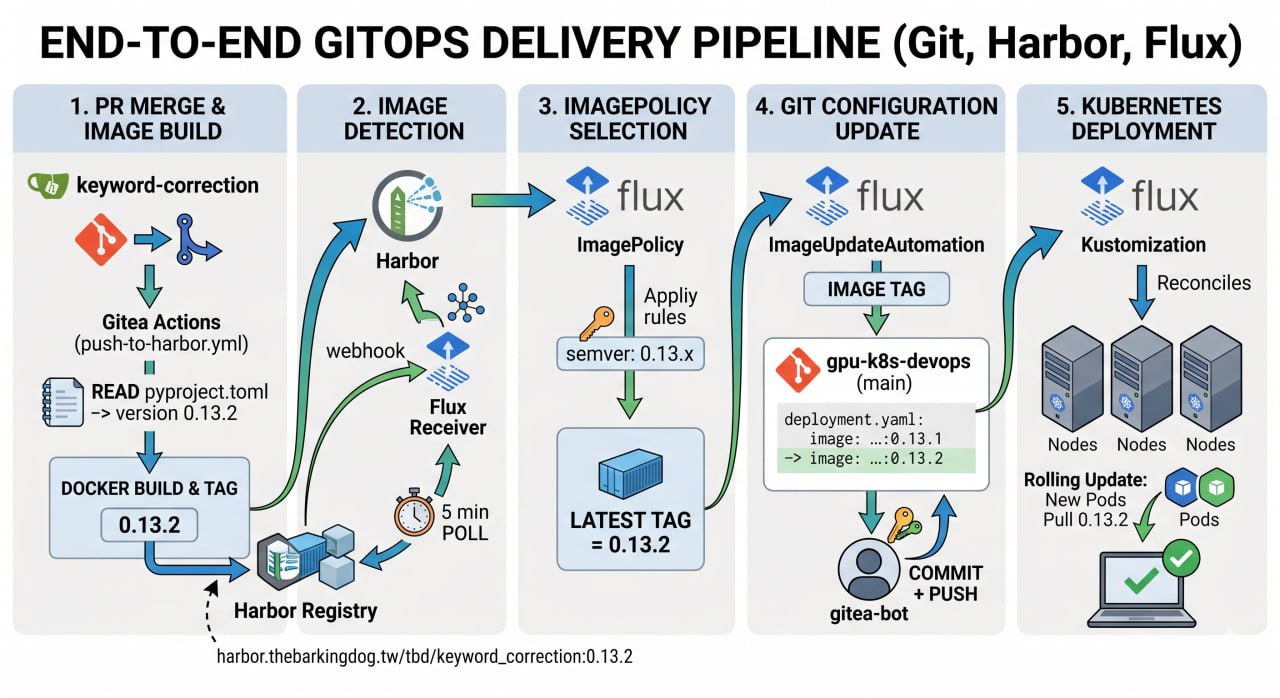
# 二、四個物件、四件事
整條 pipeline 由四個 CRD 接起來,每一個對應一件具體的事:
┌────────────────────────────────────────────────────────────────────────┐
│                                                                        │
│   Harbor (image registry)                                              │
│       │                                                                │
│       │ 「Harbor 上有哪些 tag?」                                       │
│       ↓                                                                │
│   ┌──────────────────┐                                                 │
│   │ ImageRepository  │  每 5 分鐘掃 Harbor                            │
│   │                  │  → 把 tag 列表存在 status                       │
│   └─────────┬────────┘                                                 │
│             │                                                          │
│             │ 「這堆 tag 裡哪個是最新?」                              │
│             ↓                                                          │
│   ┌──────────────────┐                                                 │
│   │ ImagePolicy      │  套 semver/filter 規則                         │
│   │                  │  → 算出 latestRef.tag                          │
│   └─────────┬────────┘                                                 │
│             │                                                          │
│             │ 「最新版跟 deployment.yaml 上寫的不一樣,改它」          │
│             ↓                                                          │
│   ┌────────────────────┐                                               │
│   │ ImageUpdate         │  每 1 分鐘輪詢                              │
│   │ Automation         │  → 改 yaml、commit、push 回 Git              │
│   └─────────┬──────────┘                                               │
│             │                                                          │
│             │ 「Git 上 yaml 改了」                                     │
│             ↓                                                          │
│   ┌──────────────────┐                                                 │
│   │ GitRepository +  │  (上一篇講過的)                                 │
│   │ Kustomization    │  每 5/10 分鐘 reconcile                        │
│   └─────────┬────────┘                                                 │
│             │                                                          │
│             ↓                                                          │
│        Deployment                                                      │
│        滾動更新                                                        │
│                                                                        │
└────────────────────────────────────────────────────────────────────────┘
注意 GitRepository / Kustomization 不是 Image Automation 的一部分,是上一篇講過的「Flux 把 Git 同步進 cluster」的基本流程,這裡只是接受了 Image Automation 改完的 commit。
也就是說:Image Automation 沒有「直接改 cluster」這條路,它一定走 Git。這個設計刻意保留了「所有變更都有 git commit 可追」的 audit 性質。
# 三、ImageRepository:告訴 Flux「看哪個 Harbor repo」
最簡單的一塊。
# clusters/stage/flux/registry.yaml
apiVersion: image.toolkit.fluxcd.io/v1
kind: ImageRepository
metadata:
  name: keyword-correction
  namespace: flux-system
spec:
  image: harbor.thebarkingdog.tw/tbd/keyword_correction
  interval: 5m0s
  secretRef:
    name: harbor-credentials
要點:
image是 registry 路徑(不含 tag)——這物件存在的目的就是去 list 這個 repo 下的所有 tag。interval: 5m是輪詢間隔。為什麼是 5 分鐘?因為頻率太高 Harbor 會被打爆,太低又延遲——5 分鐘是 Flux 文件建議的合理預設。secretRef指向 Harbor 拉取認證(讀權限即可,不需要寫權限)。
# 想加速?走 webhook
Harbor 推完 image 後也可以打 webhook 通知 Flux 立刻去 re-scan,不用等 5 分鐘輪詢:
# clusters/stage/flux/receiver.yaml
apiVersion: notification.toolkit.fluxcd.io/v1
kind: Receiver
metadata:
  name: harbor-receiver
  namespace: flux-system
spec:
  type: generic
  secretRef:
    name: webhook-token
  resources:
    - kind: ImageRepository
      name: keyword-correction
    # ... 其他 ImageRepository
Notification controller 會給你一個 webhook URL(/hook/<hash>),在 Harbor 那邊設成 push notification target 即可。但 webhook 路徑常常被防火牆/Ingress 設定卡到——這時候 5 分鐘輪詢就是 fallback。
# 確認 Flux 看到 tag 了沒?
$ kubectl -n flux-system get imagerepository keyword-correction -o yaml
...
status:
  lastScanResult:
    tagCount: 7
    scanTime: "2026-05-13T07:06:14Z"
  ...
tagCount 跟 Harbor 上的數字對得起來就 OK。看不到?檢查 secretRef 的權限。
# 四、ImagePolicy:算出「最新版」是哪個 tag
這是整套裡最容易設定錯的一個。ImageRepository 給你一堆 tag,ImagePolicy 的工作是「從這堆 tag 裡,按某種規則算出唯一的『最新』」。
# 純 semver 的情況
apiVersion: image.toolkit.fluxcd.io/v1
kind: ImagePolicy
metadata:
  name: realtime-asr
  namespace: flux-system
spec:
  imageRepositoryRef:
    name: realtime-asr
  policy:
    semver:
      range: ">=0.0.0"
>=0.0.0 的意思是「所有合法的 semver tag 我都接受,從裡面挑最大的」。tag 列表 1.2.0, 1.2.1, 1.3.0 → latestRef = 1.3.0。
但前提是 tag 全部都是純 semver。一旦你有 latest、main-abc123、api-0.12.4 這種非標準 tag,Flux 會直接忽略它們(不報錯,只是當沒看到)。
# Filter pattern:先過濾,再 semver
實務上專案常有 prefix tag:
Harbor 上 keyword_correction 的 tag:
  0.13.3         (新格式:合一 image)
  0.13.2
  api-0.13.0     (舊格式:分開兩個 image)
  streamlit-0.13.0
  api-0.12.4
直接用 >=0.0.0 的話,api-0.13.0 不是合法 semver 會被丟掉。要納入考量得用 filterTags:
apiVersion: image.toolkit.fluxcd.io/v1
kind: ImagePolicy
metadata:
  name: keyword-correction
  namespace: flux-system
spec:
  imageRepositoryRef:
    name: keyword-correction
  filterTags:
    # 過渡期相容舊 tag(api-X.Y.Z, streamlit-X.Y.Z),穩定後可移除
    pattern: "^(?:api-|streamlit-)?(?P<version>\\d+\\.\\d+\\.\\d+.*)$"
    extract: "$version"
  policy:
    semver:
      range: ">=0.0.0"
兩個欄位的意義:
pattern:先用 regex 過濾。匹配不到的 tag 完全丟掉(例如latest、sha-abc123)。extract:從匹配到的 tag 提取「可以拿去比 semver 的字串」。(?P<version>...)是 named group,$version就是拿那個 group。
於是:
| 原始 tag | 匹配? | extract 結果 | 套進 semver |
|---|---|---|---|
0.13.3 |
✅ | 0.13.3 |
0.13.3 |
api-0.12.4 |
✅ | 0.12.4 |
0.12.4 |
streamlit-0.13.0 |
✅ | 0.13.0 |
0.13.0 |
latest |
❌ | (略過) | - |
dev-abc |
❌ | (略過) | - |
最後算出 latestRef = 0.13.3。
# Common gotchas
Gotcha 1:regex 跳脫
yaml 字串裡 \d 要寫成 \\d,否則 YAML parser 會吃掉一個 backslash。看到 pattern: "^\d+" 不工作不用懷疑,就是這個。
Gotcha 2:相容舊 tag 的責任
「過渡期相容」很容易變「永遠相容」。一旦 Harbor 還有舊格式 api-X.Y.Z 沒清掉,pattern 就要一直留 (?:api-|streamlit-)? 這個 optional group——多一個歷史包袱。
Gotcha 3:semver range 寫法
>=0.0.0← 全部接受^1.0.0← 接受 1.x.x,但不要 2.0.0(minor / patch 自動升、major 不自動升)~1.2.0← 只接受 1.2.x
生產環境如果不想被 minor 突然推大改動,建議用 ^x.y.z 鎖住 major。我們現在開發階段每個 service 都還在 0.x,所以圖方便都用 >=0.0.0。
# 確認 ImagePolicy 算出什麼?
$ kubectl -n flux-system get imagepolicy keyword-correction -o yaml
...
status:
  conditions:
    - message: |
        Latest image tag for harbor.thebarkingdog.tw/tbd/keyword_correction
        resolved to 0.13.3 (previously harbor.thebarkingdog.tw/tbd/keyword_correction:0.13.1)
      reason: Succeeded
      status: "True"
      type: Ready
  latestRef:
    tag: 0.13.3
latestRef.tag 就是 Flux 認定的「最新」。下一步把它寫進 deployment.yaml 是 ImageUpdateAutomation 的工作。
# 五、ImageUpdateAutomation:把 Policy 算出的版本寫進 Git
這是唯一會「動 Git」的 Flux 物件。
# clusters/stage/flux/automation.yaml
apiVersion: image.toolkit.fluxcd.io/v1
kind: ImageUpdateAutomation
metadata:
  name: flux-system
  namespace: flux-system
spec:
  interval: 1m0s
  sourceRef:
    kind: GitRepository
    name: flux-system
  git:
    checkout:
      ref:
        branch: main
    commit:
      author:
        email: bot@gitea.com
        name: gitea-bot
      messageTemplate: |
        Automated image update

        Automation name: <!--swig0-->

        Files:
        <!--swig1-->
        - <!--swig2-->
        <!--swig3-->

        Objects:
        <!--swig4-->
        - <!--swig5--> <!--swig6-->
        <!--swig7-->
    push:
      branch: main
  update:
    path: ./apps/stage
    strategy: Setters
幾個關鍵點:
# update.path —— 「只掃這個資料夾」
update:
  path: ./apps/stage
  strategy: Setters
Flux 不會掃整個 repo,只在 ./apps/stage 底下找可改的 yaml。
如果你有 apps/prod 但目前 prod 不想自動升版,就不要設定到那邊(這也是我們的現況)。
# strategy: Setters —— 改寫機制是「標記法」
Setters 策略表示 Flux 不會自己猜哪個 yaml 該改,而是只改 yaml 上有特殊註解標記的位置:
# apps/stage/services/keyword-correction/deployment.yaml
containers:
  - name: api
    image: harbor.thebarkingdog.tw/tbd/keyword_correction:0.13.3 # {"$imagepolicy": "flux-system:keyword-correction"}
注意行尾的 # {"$imagepolicy": "flux-system:keyword-correction"} 註解——這就是 setter marker,意思是:
「這一行的 image tag,要套用名為
keyword-correction(在flux-systemnamespace)的 ImagePolicy 算出的最新版」。
Flux 看到這行就知道:「啊,我要把這個 :0.13.3 改成 keyword-correction policy 的 latestRef.tag」。
沒這行註解 = Flux 不動這個 image。這是個刻意設計:讓 yaml 自己宣告「我要被自動更新」,避免 Flux 亂改其他 image(例如 sidecar、init container)。
# git.push.branch —— 改完 push 回哪
push:
  branch: main
直接 push 進 main。所以這個 branch 不能 protect 到不准 bot push——不然 Flux 一直失敗。
Gitea 上實際看到的 commit 長這樣:
Author: gitea-bot <bot@gitea.com>
Date:   Wed May 13 15:06:14 2026 +0800

    Automated image update

    Automation name: flux-system/flux-system

    Files:
    - apps/stage/services/keyword-correction/deployment.yaml

    Objects:
    - Deployment keyword-correction
# interval: 1m —— Automation 自己的輪詢
注意這個 1 分鐘跟 ImagePolicy 的 5 分鐘是分開的。完整鏈:
ImageRepository.interval  = 5m   ← 掃 Harbor
ImagePolicy               = 派生  ← 看 ImageRepository status 算
ImageUpdateAutomation.interval = 1m   ← 比對 ImagePolicy 跟 yaml 內容
GitRepository.interval    = 5m   ← 拉 Git(Image Automation 改完的 commit 也要靠它拉)
Kustomization.interval = 10m ← apply Git 進 cluster理論最壞情況:5 + 1 + 5 + 10 ≈ 21 分鐘才能滾完。實務上 Harbor webhook 觸發後通常 1-3 分鐘可滾。
# 六、放在一起:一次 bump 走完整鏈
把上面拆開的東西組起來,就是一個完整 bump 流程。我用我們前陣子真的踩過的 0.13.3 bump 來重現(同時呈現踩到的坑)。
# 起點:staging branch merge
# 工程師
git checkout -b bump/0.13.3
# 改 pyproject.toml 0.13.2 → 0.13.3
git commit -am "🔖 bump: version 0.13.2 → 0.13.3"
git push origin bump/0.13.3
# 開 PR bump/0.13.3 → staging, force merge
merge 之後 staging branch HEAD 在 commit 4a84856。
# CI build:把 image 推到 Harbor
.gitea/workflows/push-to-harbor.yml 觸發 build。內部 CI 的 tag 決定邏輯:
IMAGE_TAG=$(git describe --tags --abbrev=0 2>/dev/null || echo "latest")git describe --tags --abbrev=0 的意思是「從當前 commit 往回追溯,最近一個可達的 tag」。
🪤 第一個踩到的坑:我用 cz bump 在本地先打了 0.13.3 tag、推上去——但這個 tag 指向本地 commit 919ed8c。後來 staging 被 force merge,產生了全新的 commit 4a84856(Gitea force merge 會重新打 commit hash)。所以從 4a84856 往回追溯時:
4a84856 (staging)  ← 沒有 tag 指這裡
  ↓ parent
1aba89c            ← 沒有
  ↓ parent
026d938            ← tag: 0.13.2 ✅ 找到了
CI 算出 IMAGE_TAG = 0.13.2,於是 build 出來的 image 是 keyword_correction:0.13.2,把 Harbor 上原本的 0.13.2 image 覆蓋掉了。
修法:把 tag 重打到正確的 commit。
git tag -d 0.13.3                    # 刪本地舊 tag
git push origin :refs/tags/0.13.3    # 刪遠端舊 tag
git tag 0.13.3 origin/staging        # 重打到 4a84856
git push origin 0.13.3
然後 rerun CI workflow,這次才 build 出 0.13.3 image。
教訓:如果 CI 要靠 tag 決定 image version,tag 跟 branch HEAD 一定要對齊。cz bump 假設 dev 可以直接 push,但 protected branch + PR 流會把這個假設打破。
# ImageRepository 看到新 tag
5 分鐘內 image-reflector-controller 輪詢 Harbor、看到 0.13.3:
$ kubectl -n flux-system describe imagerepository keyword-correction
...
Status:
  Last Scan Result:
    Tag Count: 8     # ← 從 7 變成 8
# ImagePolicy 重新算出 latestRef
$ kubectl -n flux-system get imagepolicy keyword-correction -o yaml
...
status:
  conditions:
    - message: |
        Latest image tag ... resolved to 0.13.3 (previously ...:0.13.1)
  latestRef:
    tag: 0.13.3   # ← 升上來了
# ImageUpdateAutomation 改 yaml + commit
1 分鐘內,automation 比對 ImagePolicy.latestRef vs deployment.yaml:
# apps/stage/services/keyword-correction/deployment.yaml
   containers:
     - name: api
-      image: harbor.thebarkingdog.tw/tbd/keyword_correction:0.13.2 # {"$imagepolicy": "flux-system:keyword-correction"}
+      image: harbor.thebarkingdog.tw/tbd/keyword_correction:0.13.3 # {"$imagepolicy": "flux-system:keyword-correction"}
     - name: streamlit
-      image: harbor.thebarkingdog.tw/tbd/keyword_correction:0.13.2 # {"$imagepolicy": "flux-system:keyword-correction"}
+      image: harbor.thebarkingdog.tw/tbd/keyword_correction:0.13.3 # {"$imagepolicy": "flux-system:keyword-correction"}
由 gitea-bot commit + push 進 main:
$ git log apps/stage/services/keyword-correction/deployment.yaml --oneline | head -3
f15b4e7 Automated image update
e6df15b ♻️ refactor(keyword-correction): 改用合一 image (api + streamlit)
dd31385 Automated image update
# GitRepository 拉新 commit
$ kubectl -n flux-system get gitrepository flux-system \
  -o jsonpath='{.status.artifact.revision}'
main@sha1:f15b4e7cb16d276a1d3aae250c2c5e9f85a6050f
🪤 第二個踩到的坑:Image Automation 把 commit push 進 Git 後自己不會立刻拉。GitRepository 預設 5 分鐘輪詢——所以 commit push 後可能要等 5 分鐘 cluster 才同步。
要快可以手動戳:
kubectl -n flux-system annotate gitrepository flux-system \
  reconcile.fluxcd.io/requestedAt="$(date +%s)" --overwrite
這個 annotation 不是「設定一個值」,是「觸發一次 reconcile」——Flux controller 看到這個 annotation 改變就知道「該重新跑了」。
# Kustomization apply
GitRepository 拉到新 commit 後,kustomize-controller 比對 git vs cluster、發現 deployment.yaml 變了、執行 apply。
$ kubectl get pod -l app=keyword-correction
NAME                                  READY   STATUS              RESTARTS   AGE
keyword-correction-54c65f7cbc-fddts   0/2     ContainerCreating   0          5s
keyword-correction-d59d875c5-mp8ms    2/2     Running             1          4d11h
# 30 秒後
$ kubectl get pod -l app=keyword-correction
NAME READY STATUS RESTARTS AGE
keyword-correction-54c65f7cbc-fddts 2/2 Running 0 31s舊 pod 被殺、新 pod 跑 0.13.3、bug 修了 ✅
# 七、所有可觀察狀態的指令清單
放這裡當未來自己 cheat sheet:
# 1. Harbor 有哪些 tag (Flux 看到的)
kubectl -n flux-system describe imagerepository keyword-correction \
  | grep "Tag Count\|Latest Scan"

# 2. ImagePolicy 算出哪個是最新版
kubectl -n flux-system get imagepolicy keyword-correction \
  -o jsonpath='{.status.latestRef.tag}'; echo

# 3. ImageUpdateAutomation 上次成功 push 哪個 commit
kubectl -n flux-system get imageupdateautomation flux-system \
  -o jsonpath='{.status.lastPushCommit}'; echo
kubectl -n flux-system get imageupdateautomation flux-system \
  -o jsonpath='{.status.lastPushTime}'; echo

# 4. GitRepository 目前拉到哪個 commit
kubectl -n flux-system get gitrepository flux-system \
  -o jsonpath='{.status.artifact.revision}'; echo

# 5. Kustomization 套用狀態
kubectl -n flux-system get kustomization apps \
  -o jsonpath='{.status.lastAppliedRevision}'; echo

# 6. 強制 GitRepository 立刻 reconcile
kubectl -n flux-system annotate gitrepository flux-system \
  reconcile.fluxcd.io/requestedAt="$(date +%s)" --overwrite

# 7. 強制 ImageRepository 立刻 scan
kubectl -n flux-system annotate imagerepository keyword-correction \
  reconcile.fluxcd.io/requestedAt="$(date +%s)" --overwrite

# 8. 看 controller logs(debug 用)
kubectl -n flux-system logs deploy/image-automation-controller --tail=50
kubectl -n flux-system logs deploy/source-controller --tail=50
# 八、設計上的取捨
# 為什麼要走 Git,不直接改 Deployment?
第一次看 Image Automation 的人常問:「Flux 都裝在 cluster 裡了,為什麼不直接 kubectl set image 改 Deployment?」
答案是 Git 的 audit 功能:
- 直接改 cluster → 過幾個月誰也不知道 pod 跑的 image 是哪天部署的
- 透過 Git →
git log apps/stage/.../deployment.yaml直接看時間軸
而且 disaster recovery:cluster 整個壞掉重建,從 Git 一拉就回到上次最新狀態——前提是 Git 真的有最新狀態。
# 為什麼 ImagePolicy 跟 Update 要分開?
兩者責任不同:
- ImagePolicy 是「算出最新版」(純函式:input 是 tag 列表,output 是一個 tag)
- ImageUpdateAutomation 是「改 Git」(有 side effect:寫檔、commit、push)
分開的好處:同一個 ImagePolicy 可以被多個 deployment.yaml 同時引用。flux-system:keyword-correction 這個 policy 同時被 api container 跟 streamlit container 引用(marker 寫一樣的),兩個位置都會被改。
# 為什麼預設要走輪詢?
理論上 Harbor → Flux webhook 可以做到 0 延遲,但實務上:
- 防火牆/Ingress 設定容易卡 webhook
- webhook 漏了就完全沒救
- 輪詢是最終一致性的保證
所以 Flux 採取輪詢為 baseline、webhook 為加速器的設計。
# 九、給未來自己的提醒
整理一些常踩的坑:
| 症狀 | 大概率原因 | 怎麼查 |
|---|---|---|
| Harbor 有新 image,cluster 沒滾 | ImagePolicy 還沒算出新 latestRef | kubectl get imagepolicy -o yaml 看 latestRef.tag |
| ImagePolicy 算出來不是預期的版本 | filterTags.pattern regex 錯了 |
手動 echo "tag" \| grep -E "pattern" 試 |
| ImagePolicy OK 但 yaml 沒被改 | 忘記在 yaml 加 # {"$imagepolicy": ...} marker |
grep 那個 yaml 檔有沒有 $imagepolicy 字串 |
| yaml 被改了但 cluster 沒套 | GitRepository 還沒 reconcile | 戳 annotate 強制 reconcile |
Automated image update commit 一直失敗 |
bot 對 main branch 沒寫權限 / branch protect 擋 | 看 image-automation-controller log |
| CI build 出來 image tag 是錯的 | git describe --tags 找不到正確 tag,或 tag 指錯 commit |
確認 staging HEAD 上有 tag |
# 結語
Image Automation 是 Flux 最有「魔法感」的功能,但拆開看就是四件清楚的事:
- 掃 Harbor (ImageRepository)
- 算最新 (ImagePolicy)
- 改 Git (ImageUpdateAutomation + setter marker)
- 同步進 cluster (GitRepository + Kustomization,跟前一篇一樣)
關鍵是「Flux 不繞過 Git」——這保留了所有變更的 audit trail,也讓 disaster recovery 變得簡單。
下次 push image 看 5 分鐘內 cluster 自己升版,再也不用手動改 yaml 了 🚀
# 系列文章
【K8s 學習&觀念隨筆】系列
- (一) 傳統部署 vs GitOps:兩種部署方式的核心差異(為什麼需要 GitOps)
- (二) K8s 架構解析:從 K9s 介面看懂分散式叢集 EKS 運作原理(叢集整體觀察)
- (三) GitOps 實戰:用 Kustomize + FluxCD 管 GPU K8s 叢集(架構總覽、Kustomize 分層、SOPS/age bootstrap)
- (四) GitOps 實戰:FluxCD Image Automation 實戰(4 CRD 詳解、filterTags、bump 踩坑全記錄)